Free Printable Excel Cheat Sheet: Shortcuts & Formulas – A free printable Excel cheat sheet is one of the fastest ways to work more efficiently in Microsoft Excel. Whether you use spreadsheets for work, school, personal finance, or data analysis in the United States, having key keyboard shortcuts and essential formulas on a single printed page saves time and reduces errors. These reference guides help beginners learn the basics and give experienced users a quick lookup when they forget a function or shortcut.
This guide explains what an Excel cheat sheet typically includes, where to find legitimate free printable versions, and how to use them effectively. All recommended resources below are real, current, and free from trusted sources. This page does not create or host any printable files itself.
What Is an Excel Cheat Sheet?
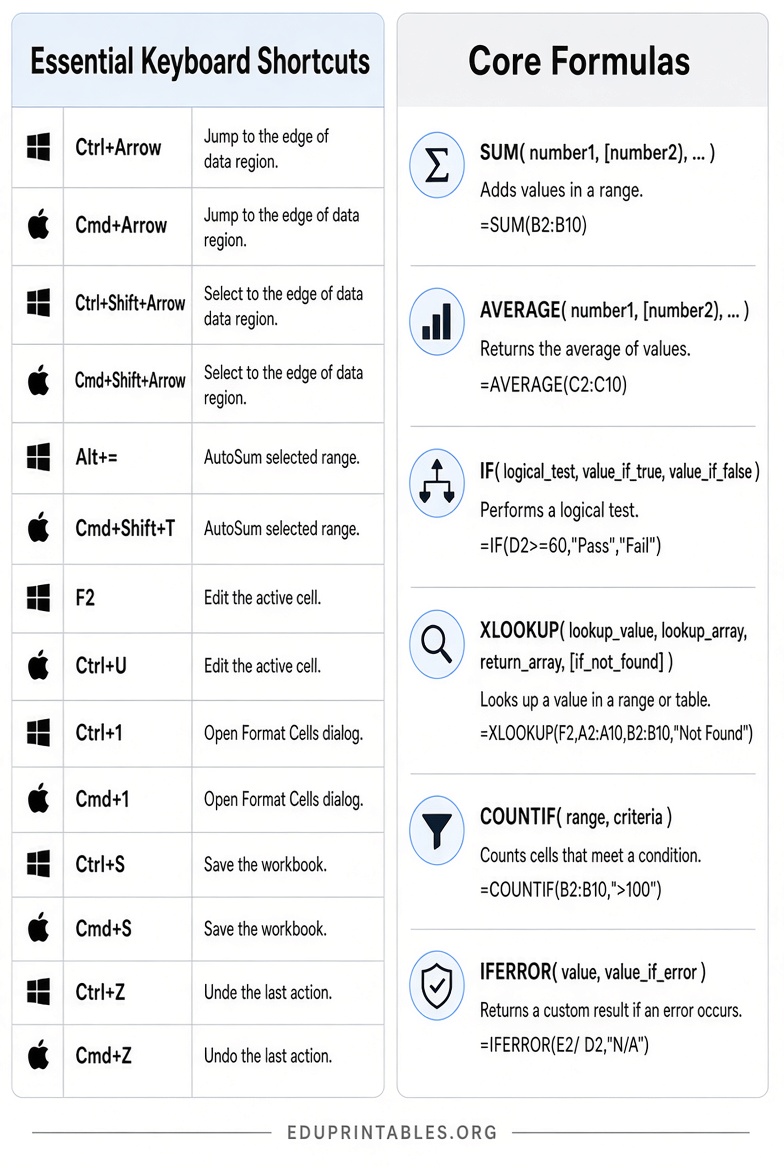
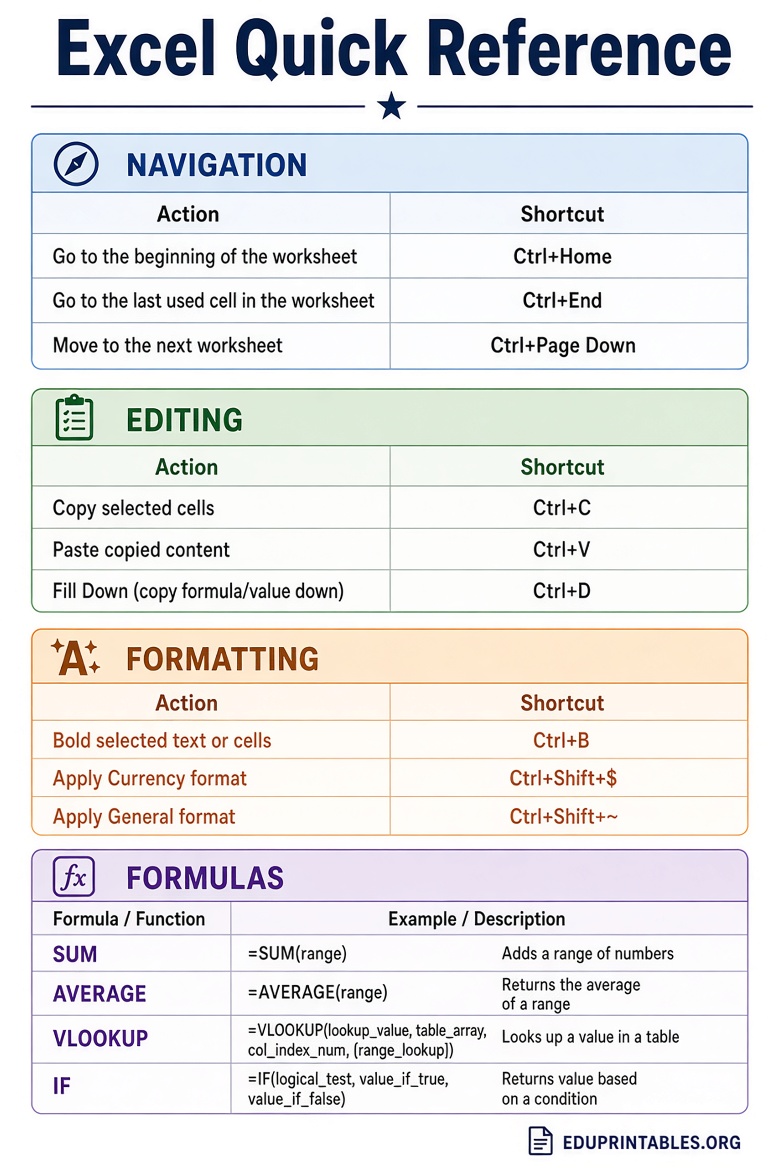
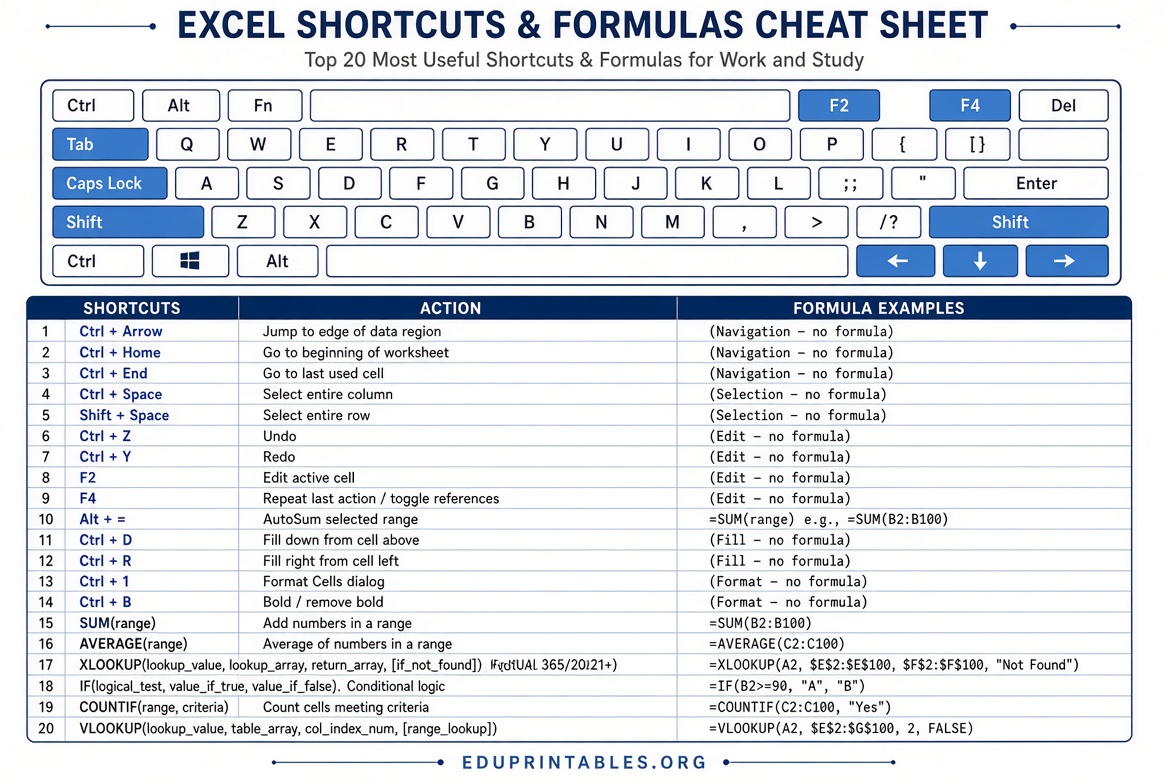
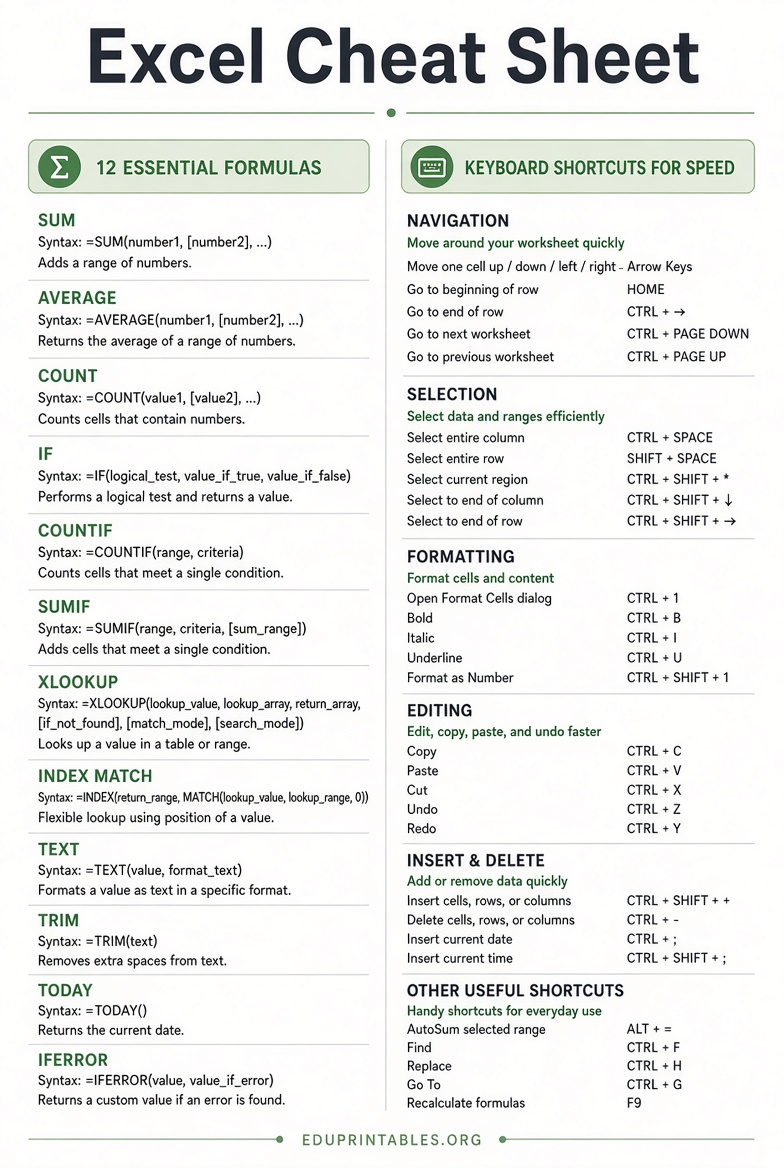
An Excel cheat sheet is a condensed reference list of the most useful keyboard shortcuts, formulas, and functions. Most printable versions organize information by category so you can scan it quickly while working.
Common sections include:
- Keyboard shortcuts for navigation, formatting, and editing (Windows and Mac versions when available)
- Essential formulas such as SUM, AVERAGE, IF, VLOOKUP, XLOOKUP, and COUNTIF
- Date, text, logical, and lookup functions
- Tips for absolute references, error handling, and common mistakes
A well-designed free printable Excel cheat sheet fits on one or two pages and is meant to sit next to your keyboard. It is especially helpful for students, office workers, analysts, and anyone who regularly builds or reviews spreadsheets.
Best Free Printable Excel Cheat Sheets
The following resources provide legitimate free access to printable Excel references. Links go directly to the official pages or download locations.
- Microsoft Support – Keyboard Shortcuts in Excel: The official reference from Microsoft covers frequently used shortcuts, ribbon access keys, navigation, formatting, and function keys for Excel on Windows and Mac. It includes a link to a 50 time-saving shortcuts quick tips guide. Visit the Microsoft Excel keyboard shortcuts page.
- Exceljet Excel Shortcuts PDF: Exceljet offers a free, well-organized PDF with more than 200 keyboard shortcuts for both Windows and Mac, color-coded and grouped by task. It is one of the most complete free printable Excel shortcuts resources available. Get it from the Exceljet Excel Shortcuts PDF page.
- Dataquest Microsoft Excel Cheat Sheet: This free downloadable PDF lists common functions with clear syntax and explanations, covering math, lookup, date, logical, text, and more. It is practical for everyday spreadsheet work. Download it from the Dataquest Excel Cheat Sheet page.
- Skillademia Excel Formulas Cheat Sheet: A searchable and printable reference with 80+ essential formulas grouped into math, lookup, text, logic, conditional, date/time, and financial categories. Each entry includes syntax and a short example. Access the free printable version at the Skillademia Excel Formulas Cheat Sheet.
- Corporate Finance Institute Excel Formulas Cheat Sheet: A clear, categorized list of the most important formulas with simple examples for dates, lookups, math, and logical functions. Useful as both a learning aid and desk reference. See the full list on the CFI Excel Formulas Cheat Sheet page.
These five sources prioritize official or highly reputable educational and Excel specialist sites. Always download files only from the linked pages above and avoid third-party sites that may host outdated or unofficial copies.
Free Printable Excel Cheat Sheet: Shortcuts & Formulas
How to Use Your Excel Cheat Sheet Effectively?
Print the sheet in color if possible so categories and Windows/Mac differences stand out. Place it near your monitor or tape the most-used shortcuts to the side of your screen.
Start with a small set of high-impact items rather than trying to memorize everything:
- Ctrl + Arrow keys (Windows) or Cmd + Arrow keys (Mac) to jump to the edge of data
- Ctrl + Shift + Arrow keys to select ranges quickly
- Alt + = for AutoSum
- F2 to edit a cell
- Ctrl + 1 to open Format Cells
- Core formulas: SUM, AVERAGE, IF, XLOOKUP or VLOOKUP, and IFERROR
Use the sheet as a prompt while you work. After a week of deliberate practice, many shortcuts become automatic. Keep both a shortcuts sheet and a formulas sheet if your work involves frequent calculations and data cleanup.
Printing Tips for Best Results
Most free Excel cheat sheets are designed for standard US Letter paper. Open the PDF in a browser or Adobe Reader, choose “Fit to page” or “Actual size,” and select landscape orientation if the layout is wide. Print on one side first to check readability, then adjust margins if needed. For frequent use, consider printing on heavier paper or laminating a single-page version so it lasts longer on your desk.
If a resource requires an email to download the PDF, use a secondary address if you prefer to limit marketing messages. The resources listed above are free with no paid upgrade required for the basic printable.
Frequently Asked Questions
Are these Excel cheat sheets really free?
Yes. The five resources linked above provide free access to printable PDFs or complete online references. No payment is required for the basic materials.
Do the shortcuts work on both Windows and Mac?
Many do, but some differ. The Exceljet PDF and Microsoft Support page clearly list both versions side by side, which is helpful if you switch between computers.
Which formulas should beginners learn first?
Focus on SUM, AVERAGE, COUNT, IF, and a basic lookup (VLOOKUP or XLOOKUP). These cover the majority of everyday tasks in business and school spreadsheets.
Can I use the same formulas in Google Sheets?
Most common Excel formulas work the same way in Google Sheets. Newer functions such as XLOOKUP are also available in both. Check the specific sheet for any noted differences.
How often should I update my printed cheat sheet?
Core shortcuts and formulas change slowly. Review official Microsoft documentation once or twice a year, or when you upgrade Excel versions, to catch any new useful shortcuts.
A free printable Excel cheat sheet is a practical tool that pays for itself in time saved. Start with the official Microsoft shortcuts reference and one formulas PDF, then expand as your needs grow. Keep the sheet nearby, practice a few items each day, and you will notice faster, more confident work in Excel.